Maintenance
Masternodes require regular maintenance to ensure you do not drop off the payment queue. This includes promptly installing updates to Axe, as well as maintaining the security and performance of the server. In addition, masternodes should vote on proposals and perform other tasks in the interest of the network and the value of the Axe they hold.
Masternode Software Update
The Axe Core software requires regular updates in order to remain consistent with the current network consensus. Depending on whether you installed Axe manually or using axerunner, you must follow the procedure appropriate for your masternode, as described below.
Option 1: Updating from axerunner
To update Axe using axerunner, log in to your server and enter the following commands:
~/axerunner/axerunner sync
~/axerunner/axerunner update
Check the status of your masternode:
~/axerunner/axerunner status
The Axe software on the masternode is now updated.
Option 2: Manual update
To update Axe manually, log in to your server using ssh or PuTTY. If
your crontab contains an entry to automatically restart axed, invoke
crontab -e and comment out the appropriate line by adding the #
character. It should look something like this:
# * * * * * pidof axed || ~/.axecore/axed
Then stop Axe running:
~/.axecore/axe-cli stop
Visit the GitHub releases page and copy the link to the latest x86_64-linux-gnu version. Go back to your terminal window and enter the following command, pasting in the address to the latest version of Axe Core by right clicking or pressing Ctrl + V:
cd /tmp
wget https://github.com/axerunners/axe/releases/download/v1.2.0/axecore-1.2.0-x86_64-linux-gnu.tar.gz
Verify the integrity of your download by running the following command
and comparing the output against the value for the file as shown in the
SHA256SUMS.asc file:
sha256sum axecore-1.2.0-x86_64-linux-gnu.tar.gz
Extract the compressed archive and copy the new files to the directory:
tar xfv axecore-1.2.0-x86_64-linux-gnu.tar.gz
cp -f axecore-1.2.0/bin/axed ~/.axecore/
cp -f axecore-1.2.0/bin/axe-cli ~/.axecore/
Restart Axe:
~/.axecore/axed
You will see a message reading “Axe Core server starting”. We will now update Sentinel:
cd ~/.axecore/sentinel/
git checkout master
git pull
Finally, uncomment the line to automatically restart Axe in your
crontab by invoking crontab -e again and deleting the #
character.
The Axe software on the masternode is now updated.
Updating Masternode Information
Periodically, it may be necessary to update masternode information if any information relating to the owner or operator changes. Examples may include a change in IP address, change in owner/operator payout address, or change in percentage of the reward allocated to an operator. It is also possible to revoke a masternode’s registered status (in the event of a security breach, for example) to force both owner and operator to update their details.
ProUpServTx
A Provider Update Service Transaction (ProUpServTx) is used to update information relating to the operator. An operator can update the IP address and port fields of a masternode entry. If a non-zero operatorReward was set in the initial ProRegTx, the operator may also set the scriptOperatorPayout field in the ProUpServTx. If scriptOperatorPayout is not set and operatorReward is non-zero, the owner gets the full masternode reward. The ProUpServTx takes the following syntax:
protx update_service proTxHash ipAndPort operatorKey (operatorPayoutAddress feeSoureceAddress)
Where:
proTxHash: The hash of the initial ProRegTxipAndPort: IP and port in the form “ip:port”operatorKey: The operator BLS private key associated with the registered operator public keyoperatorPayoutAddress(optional): The address used for operator reward payments. Only allowed when the ProRegTx had a non-zerooperatorRewardvalue.feeSourceAddress(optional): An address used to fund ProTx fee.operatorPayoutAddresswill be used if not specified.
Example:
protx update_service d6ec9a03e1251ac8c34178f47b6d763dc4ea6d96fd6eddb3c7aae2359e0f474a 140.82.59.51:10002 4308daa8de099d3d5f81694f6b618381e04311b9e0345b4f8b025392c33b0696 yf6Cj6VcCfDxU5yweAT3NKKvm278rVbkhu

fad61c5f21cf3c0832f782c1444d3d2e2a8dbff39c5925c38033730e64ecc598
The masternode is now removed from the PoSe-banned list, and the IP:port and operator reward addresses are updated.
ProUpRegTx
A Provider Update Registrar Transaction (ProUpRegTx) is used to update information relating to the owner. An owner can update the operator’s BLS public key (e.g. to nominate a new operator), the voting address and their own payout address. The ProUpRegTx takes the following syntax:
protx update_registrar proTxHash operatorKeyAddr votingKeyAddr payoutAddress (feeSourceAddress)
Where:
proTxHash: The transaction id of the initial ProRegTxoperatorKeyAddr: An updated BLS public key, or 0 to use the last on-chain operator keyvotingKeyAddr: An updated voting key address, or 0 to use the last on-chain operator keypayoutAddress: An updated Axe address for owner payments, or 0 to use the last on-chain operator keyfeeSourceAddress(optional): An address used to fund ProTx fee.PayoutAddresswill be used if not specified.
Example to update payout address:
protx update_registrar cedce432ebabc9366f5eb1e3abc219558de9fbd2530a13589b698e4bf917b8ae 0 0 yi5kVoPQQ8xaVoriytJFzpvKomAQxg6zea
ProUpRevTx
A Provider Update Revocation Transaction (ProUpRevTx) is used by the operator to terminate service or signal the owner that a new BLS key is required. It will immediately put the masternode in the PoSe-banned state. The owner must then issue a ProUpRegTx to set a new operator key. After the ProUpRegTx is mined to a block, the new operator must issue a ProUpServTx to update the service-related metadata and clear the PoSe- banned state (revive the masternode). The ProUpRevTx takes the following syntax:
protx revoke proTxHash operatorKey (reason feeSourceAddress)
Where:
proTxHash: The transaction id of the initial ProRegTxoperatorKey: The operator BLS private key associated with the registered operator public keyreason(optional): Integer value indicating the revocation reasonfeeSourceAddress(optional): An address used to fund ProTx fee.operatorPayoutAddresswill be used if not specified.
Example:
protx revoke 9f5ec7540baeefc4b7581d88d236792851f26b4b754684a31ee35d09bdfb7fb6 565950700d7bdc6a9dbc9963920bc756551b02de6e4711eff9ba6d4af59c0101
AxeCentral voting, verification and monitoring
AxeCentral is a community-supported website managed by community member Rango. It has become a de facto site for discussion of budget proposals and to facilitate voting from a graphical user interface, but also offers functions to monitor masternodes.
Adding your masternode to AxeCentral
Axecentral allows you to vote on proposals from the comfort of your browser. After completing registration, go to the masternodes page and click the Add masternode now button. Enter your collateral address on the following screen:
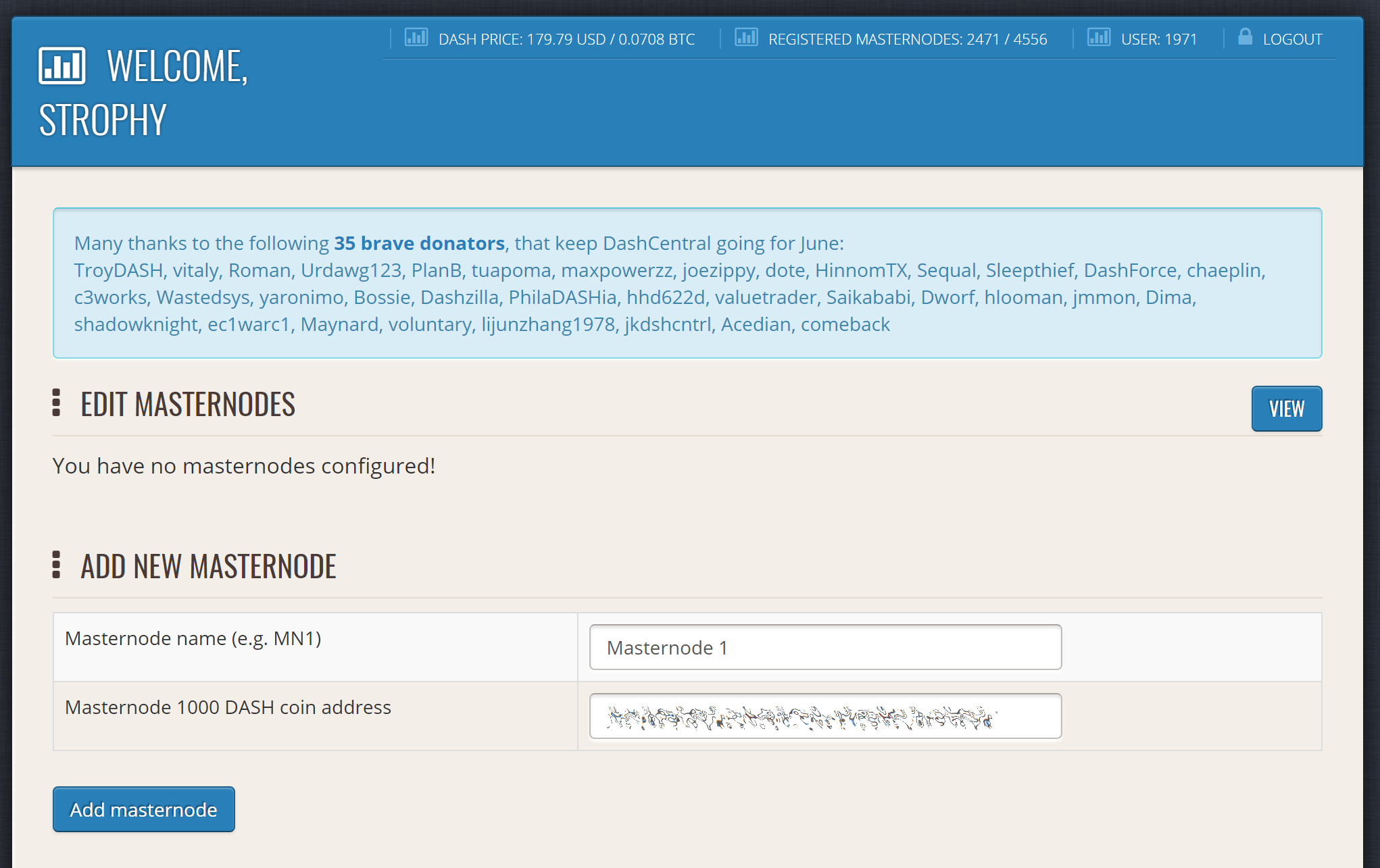
Adding a masternode to AxeCentral
Click Add masternode. Your masternode has now been added to AxeCentral.
Enabling voting from AxeCentral
Click Edit under Voting privkeys to enter your masternode private key to enable voting through the AxeCentral web interface. Enter a voting passphrase (not the same as your login password, but equally important to remember!) and enter the private key (the same key you used in the axe.conf file on your masternode) on the following screen:
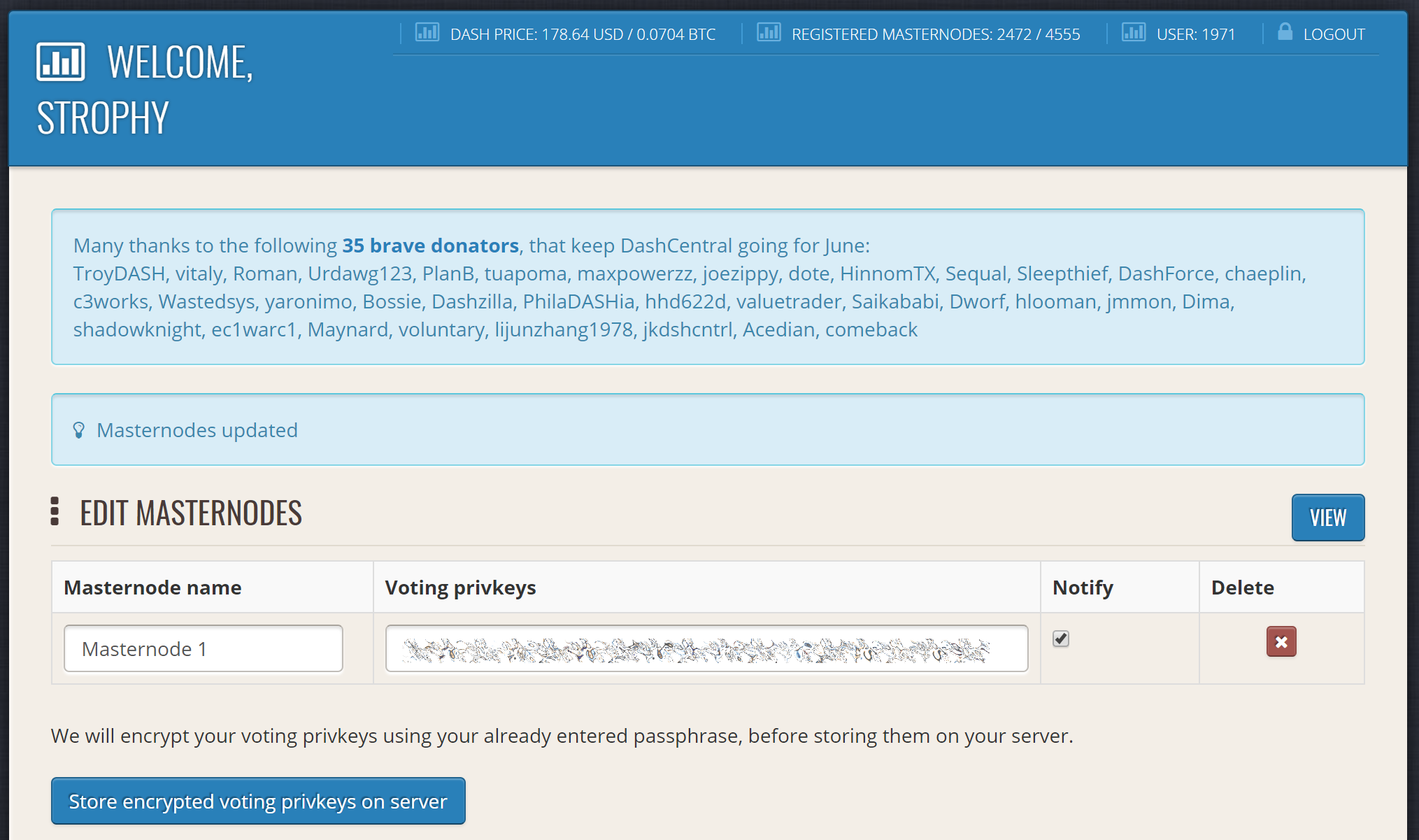
Adding voting privkeys to AxeCentral
It is important to note that the private key to start your masternode is unrelated to the private keys to the collateral address storing your 1000 AXE. These keys can be used to issue commands on behalf of the masternode, such as voting, but cannot be used to access the collateral. The keys are encrypted on your device and never stored as plain text on AxeCentral servers. Once you have entered the key, click Store encrypted voting privkeys on server. You can now vote on proposals from the AxeCentral web interface.
Verifying ownership
You can also issue a message from your address to verify ownership of your masternode to AxeCentral. Click Unverified under Ownership and the following screen will appear:
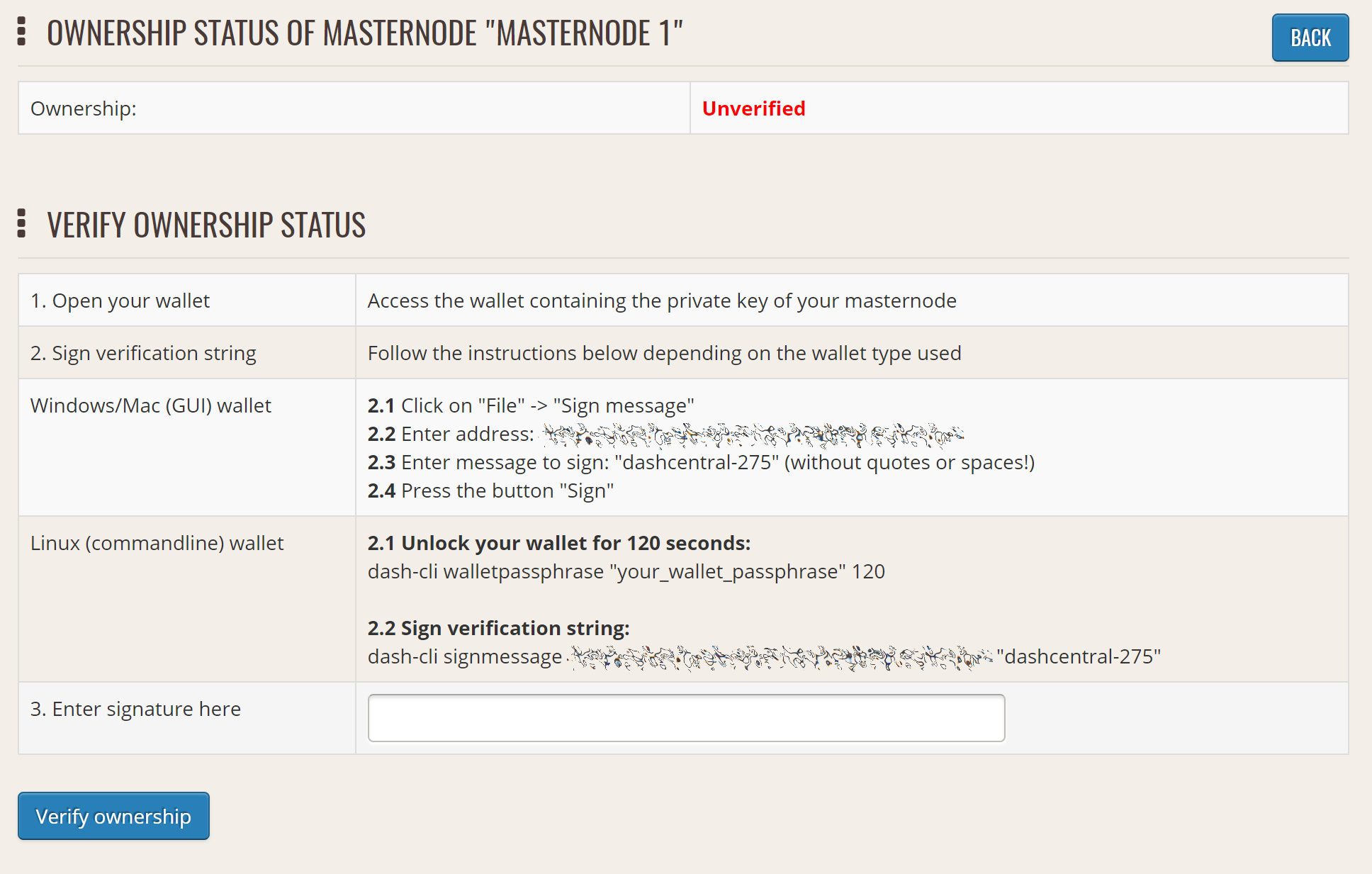
Verifying ownership of your masternode to AxeCentral
Instructions on how to sign your collateral address using a software wallet appear. If you are using a hardware wallet other than Trezor, you will need to use the DMT app to sign the address. If you are using the Trezor hardware wallet, go to your Trezor wallet, copy the collateral address and click Sign & Verify. The following screen will appear, where you can enter the message provided by AxeCentral and the address you wish to sign:
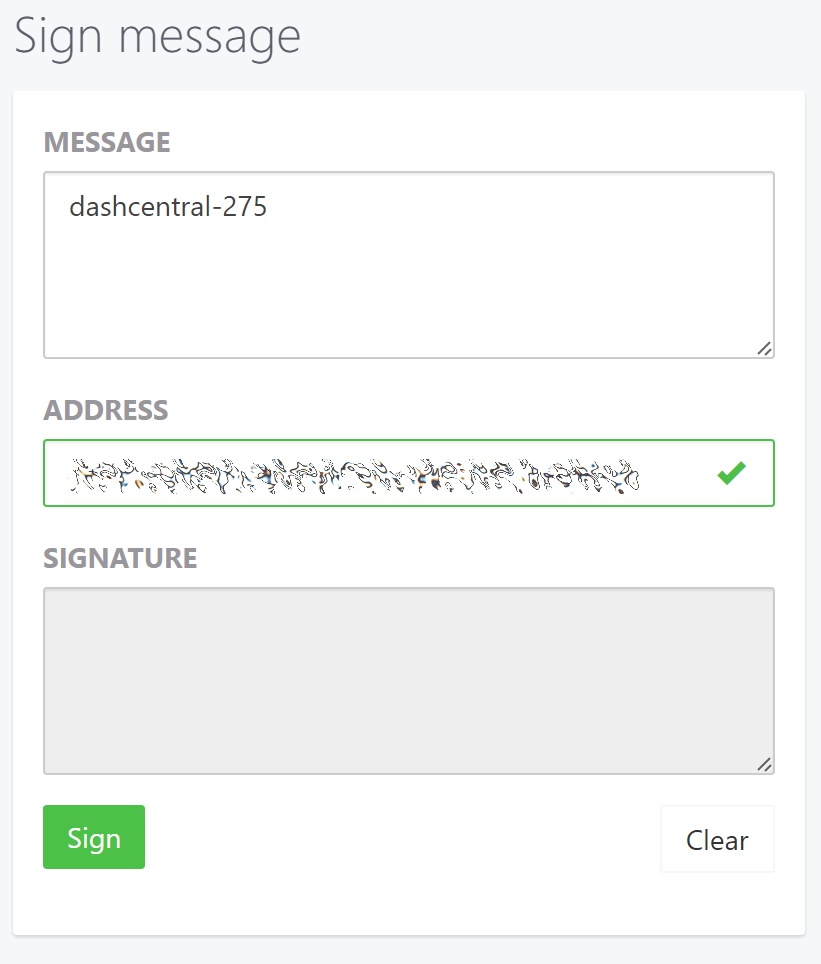
Signing a message from the Trezor Wallet
Click Sign, confirm on your Trezor device and enter your PIN to sign the message. A message signature will appear in the Signature box. Copy this signature and paste it into the box on AxeCentral and click Verify ownership. Verification is now complete.
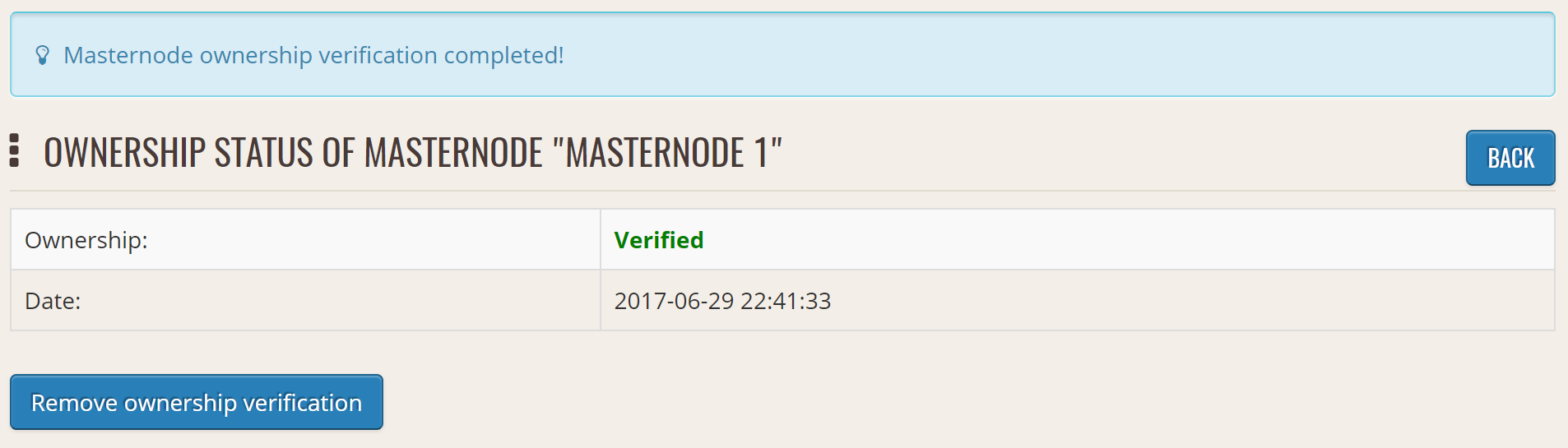
Masternode ownership has been successfully verified
Installing the AxeCentral monitoring script
AxeCentral offers a service to monitor your masternode, automatically restart axed in the event of a crash and send email in the event of an error. Go to the Account settings page and generate a new API key, adding a PIN to your account if necessary. Scroll to the following screen:
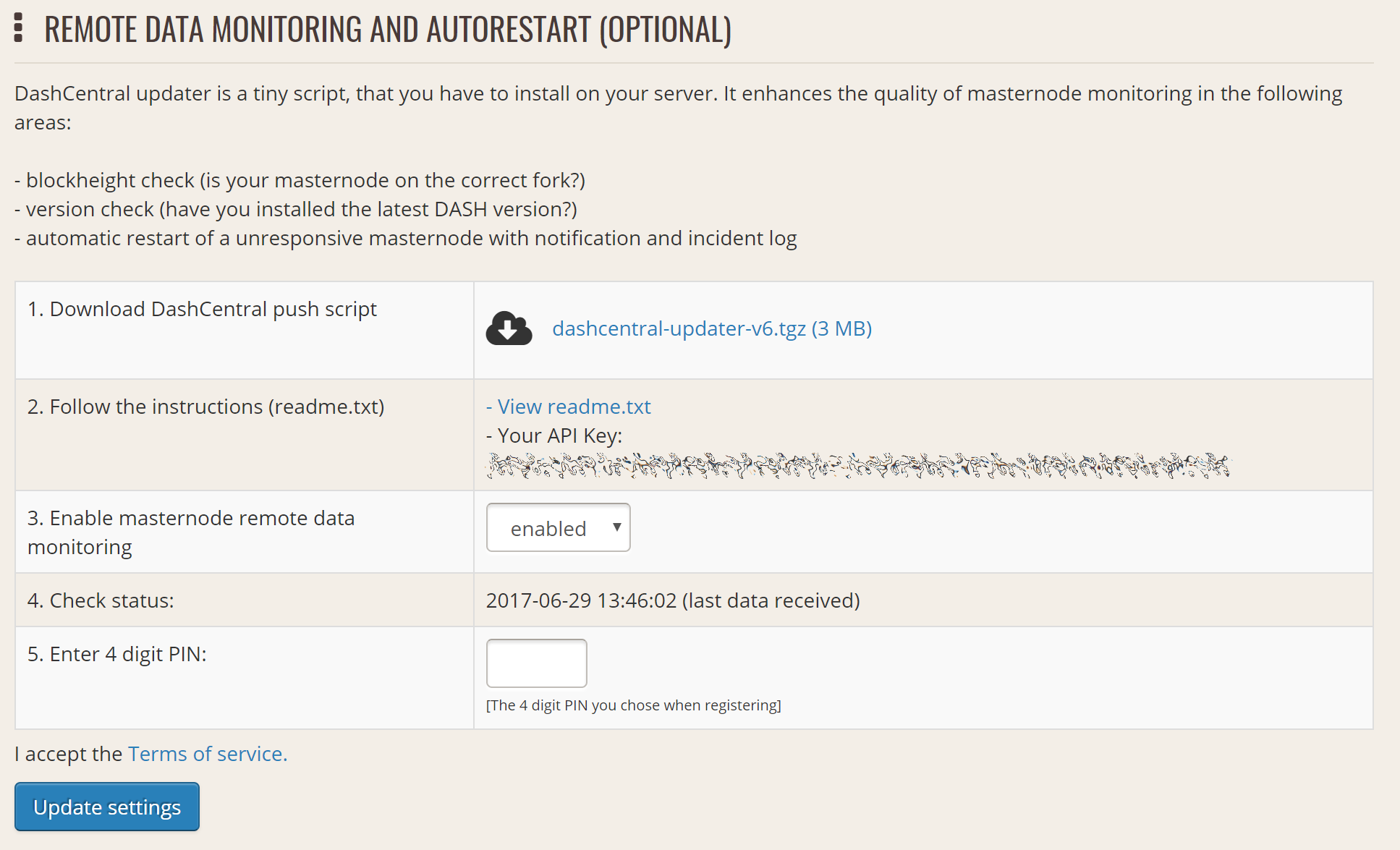
Setting up the AxeCentral monitoring script
Copy the link to the current version of the axecentral script by right- click and selecting Copy link address. Open PuTTY and connect to your masternode, then type:
wget https://www.axecentral.org/downloads/axecentral-updater-v6.tgz
Replace the link with the current version of axecentral-updater as necessary. Decompress the archive using the following command:
tar xvzf axecentral-updater-v6.tgz
View your masternode configuration details by typing:
cat .axecore/axe.conf
Copy the values for rpcuser and rpcpassword. Then edit the
axecentral configuration by typing:
nano axecentral-updater/axecentral.conf
Replace the values for api_key, your masternode collateral address,
rpc_user, rpc_password, daemon_binary and daemon_datadir
according to your system. A common configuration, where lwhite is
the name of the Linux user, may look like this:
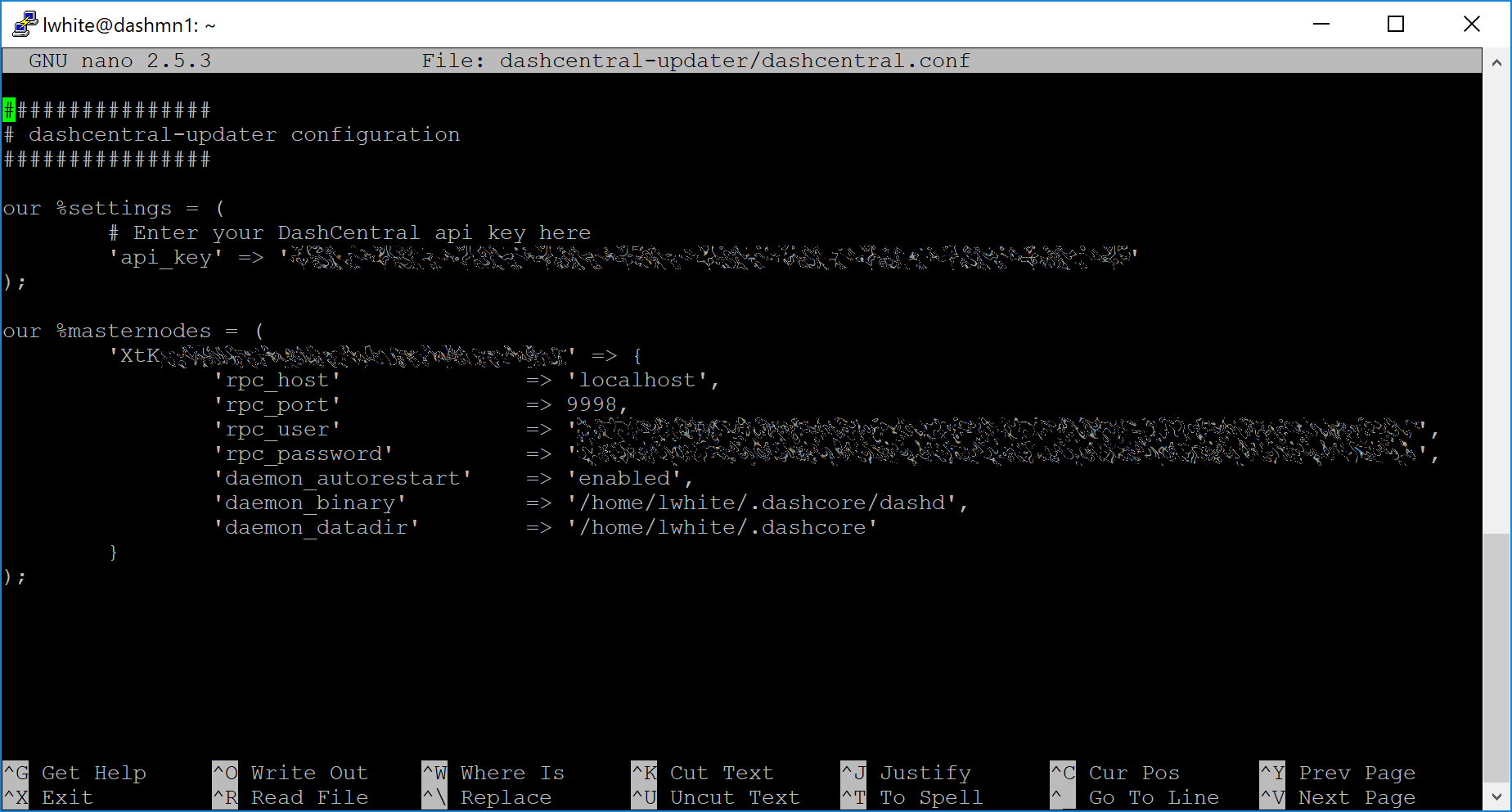
AxeCentral updater configuration file
################
# axecentral-updater configuration
################

our %settings = (
    # Enter your AxeCentral api key here
    'api_key' => 'api_key_from_axecentral'
);

our %masternodes = (
    'masternode_collateral_address' => {
        'rpc_host'           => 'localhost',
        'rpc_port'           => 9998,
        'rpc_user'           => 'rpc_user_from_axe.conf',
        'rpc_password'       => 'rpc_password_from_axe.conf',
        'daemon_autorestart' => 'enabled',
        'daemon_binary'      => '/home/<username>/.axecore/axed',
        'daemon_datadir'     => '/home/<username>/.axecore'
    }
);
Press Ctrl + X to exit, confirm you want save with Y and press Enter. Test your configuration by running the axecentral script, then check the website. If it was successful, you will see that an update has been sent:
axecentral-updater/dcupdater
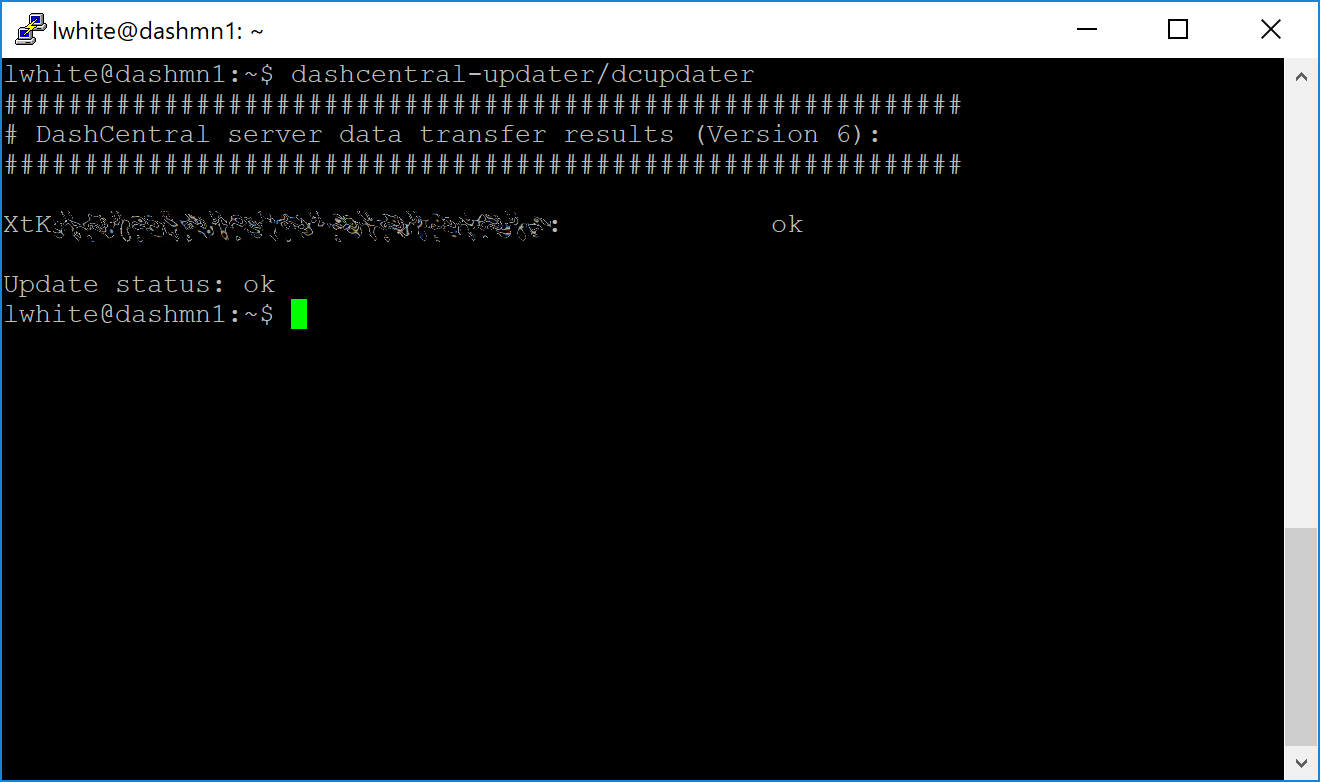
Manually testing the AxeCentral updater
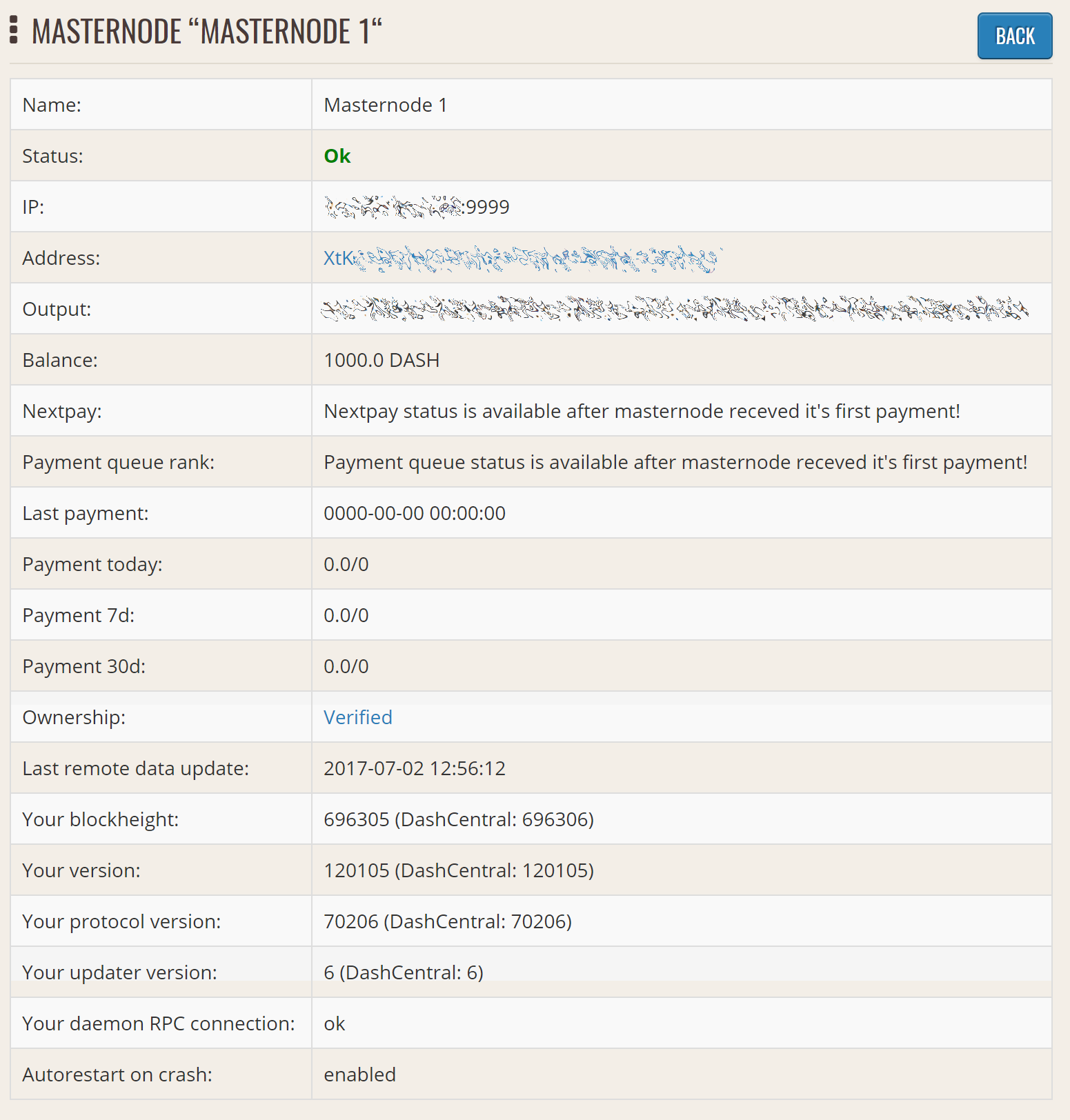
AxeCentral updater has successfully sent data to the AxeCentral site
Once you have verified your configuration is working, we can edit the crontab on your system to schedule the dcupdater script to run every 2 minutes. This allows the system to give you early warning in the event of a fault and will even restart the axed daemon if it hangs or crashes. This is an effective way to make sure you do not drop off the payment queue. Type the following command:
crontab -e
Select an editor if necessary and add the following line to your crontab after the line for sentinel, replacing lwhite with your username on your system:
*/2 * * * * /home/lwhite/axecentral-updater/dcupdater
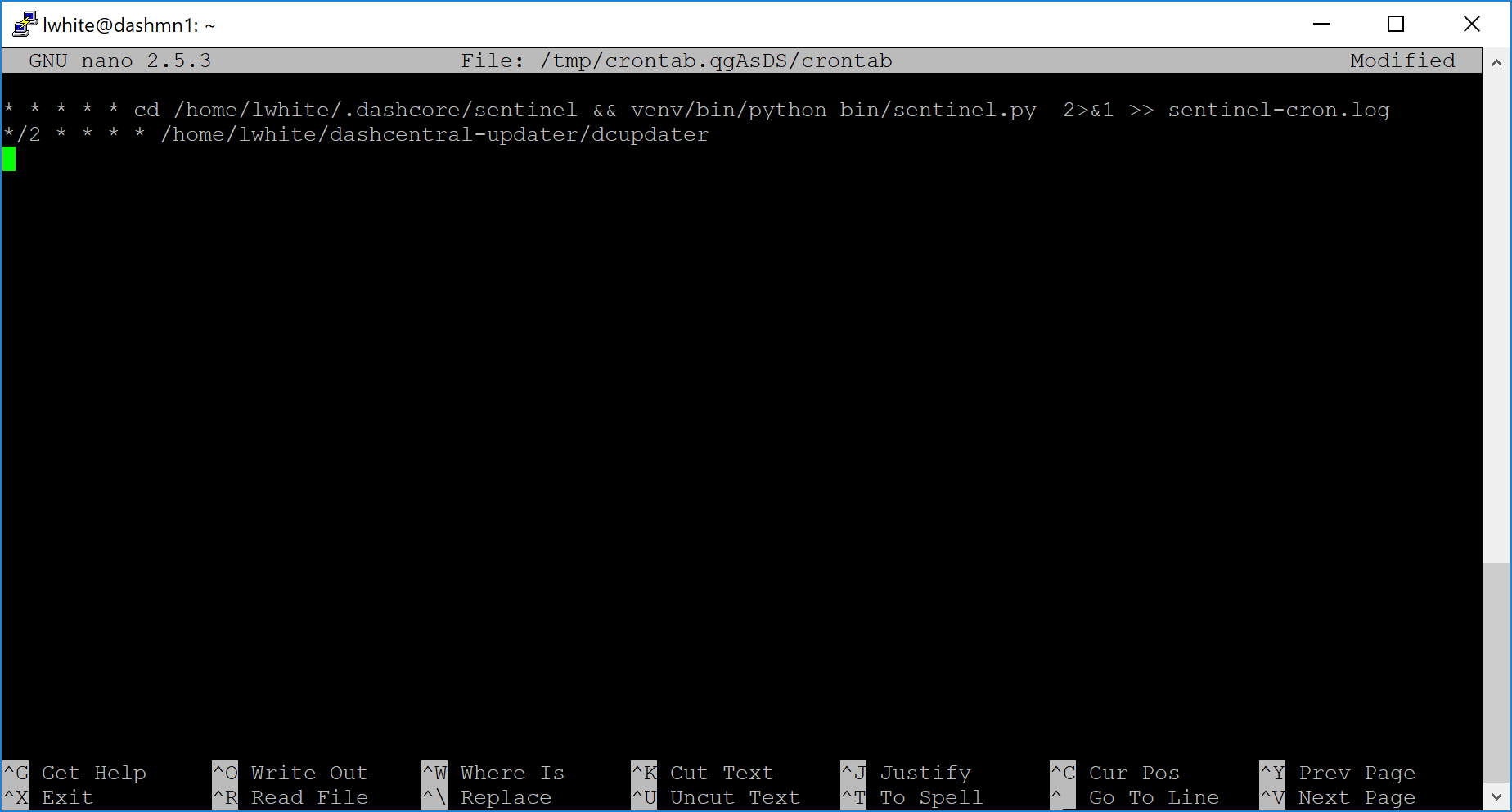
Editing crontab to run the AxeCentral updater automatically
Press Ctrl + X to exit, confirm you want save with Y and press Enter. The dcupdater script will now run every two minutes, restart axed whenever necessary and email you in the event of an error.
Masternode monitoring tools
Several sites operated by community members are available to monitor key information and statistics relating to the masternode network.
Block Explorers
Since Axe is a public blockchain, it is possible to use block explorers to view the balances of any Axe public address, as well as examine the transactions entered in any given block. Each unique transaction is also searchable by its txid. A number of block explorers are available for the Axe network.
- CryptoID offers a Axe blockchain explorer and a function to view and map Axe masternodes.
- BitInfoCharts offers a page of price statistics and information and a blockchain explorer.
- CoinCheckup offers a range of statistics and data on most blockchains, including Axe.
- CoinPayments offers a simple Axe blockchain explorer.
- axerunners.com includes two blockchain explorers at explorer.docs.axerunners.com and insight.docs.axerunners.com.
- Trezor operates a blockchain explorer powered by a Axe fork of insight, an advanced blockchain API tool
Axe Masternode Tool
https://github.com/Bertrand256/axe-masternode-tool
Written and maintained by community member Bertrand256, Axe Masternode Tool (DMT) allows you to start a masternode from all major hardware wallets such as Trezor, Ledger and KeepKey. It also supports functions to vote on proposals and withdraw masternode payments without affecting the collateral transaction.
AXE Ninja
AXE Ninja, operated by forum member and Axe Core developer elbereth, offers key statistics on the adoption of different versions of Axe across the masternode network. Several features to monitor governance of the Axe, the masternode payment schedule and the geographic distribution of masternodes are also available, as well as a simple blockchain explorer.
AxeCentral
AxeCentral, operated by forum member rango, offers an advanced service to monitor masternodes and vote on budget proposals through an advanced web interface. An Android app is also available.
Masternode.me
Masternode.me, operated by forum member and Axe Core developer moocowmoo, offers sequential reports on the price, generation rate, blockchain information and some information on masternodes.
Axe Masternode Information
http://178.254.23.111/~pub/Axe/Axe_Info.html
This site, operated by forum member and Axe Core developer crowning, offers a visual representation of many key statistics of the Axe masternode network, including graphs of the total masternode count over time, price information and network distribution.